Motion capture moves between games and film differently than people assume
What an optical motion-capture system records is not a performance anyone can watch. Reflective markers on a suit become clouds of three-dimensional points, and those points must be turned into a moving skeleton before any character stirs on screen. The gap between capture and final image is filled by reconstruction, retargeting, blending and the very different needs of a cutscene versus a playable moment in a game. A performer’s movements survive only as parsed joint angles, never as a single take that reaches the audience whole.
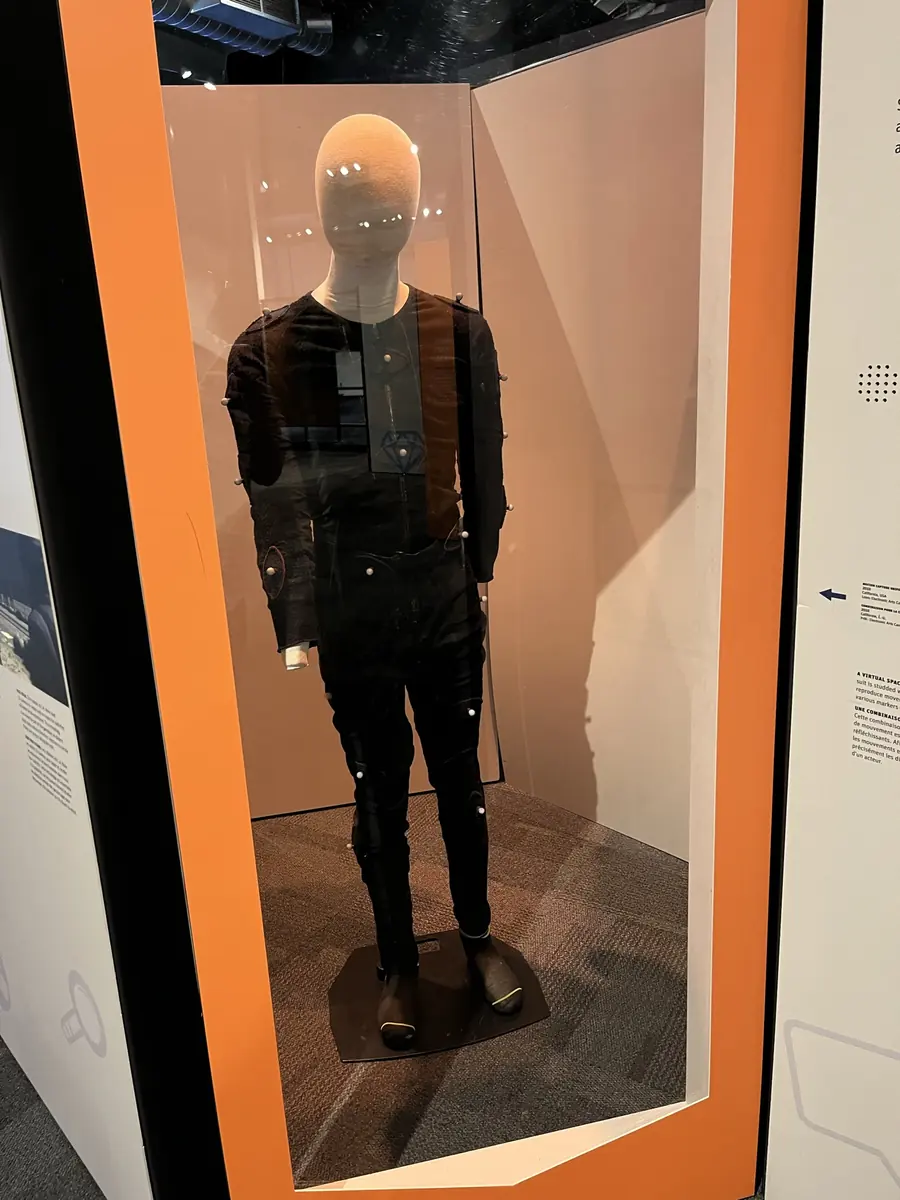
Marker data, not a performance
The cameras ringing a capture volume record the changing positions of dozens of small reflective spheres. At least two cameras are needed to triangulate a point, and professional rigs use many more. Each frame produces a set of two-dimensional blobs; from those, software reconstructs the three-dimensional location of every marker at that instant. This is marker reconstruction – step one, and purely geometric. The result is a swimming cloud of dots with no structure, no knowledge of which dot belongs to an elbow or a knee. Nothing has been “acted” in the sense of a finished motion; the data is exactly a list of coordinates in space, over time.
Marker tracking is what gives those dots identity. The system must follow each marker from frame to frame, coping with occlusions where a limb briefly hides a marker from view. Only after tracking is there a continuous path. Model-based optical capture then imposes a skeleton on the cloud. It needs to know, for each marker, where that marker sits relative to a bone, how long the underlying limb is, and which limb the marker is assigned to. All of that must be derived or supplied before the software can compute how a joint moved.
Reconstructing a moving skeleton
The sequence from raw markers to articulated motion runs in three stages. First, the three-dimensional position of every marker is calculated from the camera images. Then the software groups those markers into limbs – identifying which markers belong to the upper arm, which to the forearm – a step that can fail when markers are placed too close together or when a performer’s body moves in an unexpected way. Finally, the size and pose of the skeleton is inferred from those labelled marker paths. Joint angles are what comes out. The original movement has been abstracted into a set of rotations at the shoulder, elbow, wrist, hip, knee and ankle. That set of numbers is what the rest of the pipeline begins with, not a video clip.
What the performer wore never stored the whole thing. The suit contributed no voice, no facial expression, no contact force with the ground. It instrumented twenty or thirty points on the body. Everything else is layered on later, often with separate capture sessions and very different tooling.
Remapping motion to a rig that was not there
Skeletal motion data rarely drives the skeleton it was recorded on. The target character will have different limb proportions, a longer spine, shorter arms – and the motion must be retargetted. Engine documentation shows that this is anything but automatic. Epic’s developer materials for Unreal Engine detail how Sequencer blends animation sequences by trimming clips, aligning them so bones match, and pushing overlapping regions together to create one smooth take. Specific controls let an artist match a selected bone with the previous clip, lock the root bone’s X and Y translation across a transition, and independently match the root’s Z height. Those are not cosmetic preferences; they are required to stop feet sliding through the floor or hands floating off a table.
Blending itself is a separete discipline. Unity’s Playables API, as described in its manual, organises multiple animation data sources into a tree of nodes that can be mixed, blended and modified through a single output. An AnimationMixerPlayable takes two or more AnimationClipPlayable clips and blends them, with weights adjusted dynamically through SetInputWeight. The same principle appears in Unreal Engine, where gameplay poses and Sequencer animation are combined on a Slot inside an Animation Blueprint, and the engine insists that the same Animation Blueprint used for gameplay should also drive the character inside Sequencer. Without that symmetry, the blend between interactive motion and a scripted shot breaks apart.
Why cutscenes and gameplay animation look different
A cinematic shot inside Sequencer is assembled from clips that are pushed together by hand, with overlaps tuned until the motion reads as continuous. The animator controls every frame. A gameplay rig, by contrast, never runs a single long take. It lives inside a blend tree or a state machine, reading the player’s input and choosing which scrap of motion to play next. Unity’s Playables tree can mix multiple clips at once, fading between a walk and a run, or blending a gun-aim pose over a crouch. That is not captured; it is authored as a library of small, reusable clips – start walking, stop, turn left, turn right – each no more than a second or two long.
The splitting point is where retargetting meets runtime logic. Even when the same character model appears in both a cutscene and gameplay, the pipeline diverges. In a cutscene, Sequencer aligns and matches bones across pre-trimmed clips to create one unbroken motion. In gameplay, the Animation Blueprint blends the current gameplay pose with whatever the Sequencer demands when the mode switches, but the underlying locomotion system still runs from fragments. A walk cycle repeats, blending into an idle, then into a crouch. The computer does the reassembly every tick, not once at authoring time.
What the published pipeline leaves out
The documents that describe these steps are scattered across engine manuals, university course notes and research papers. No single published procedure walks from raw markers to a finished shot end to end. Facial capture is the largest gap. The mechanical side – how a face rig is driven – appears in product sheets, but the precise chain that ties a captured expression to a driven model is not laid out in the same developer documentation that so thoroughly covers skeletal blending. Voice recording is similarly separate. In standard practice, body capture is recorded as silent motion; dialogue is recorded in a studio session and matched later, but no union rule or engine specification examined states that as the only method.
Retargeting onto a character with a different skeleton also creates contact errors that documentation acknowledges only indirectly. The controls for root height and bone matching target smooth transitions, not the remedial work of sliding feet or penetrating hands. And while the distinction between a curated Sequencer timeline and a gameplay state machine is clear once you have read both sets of pages, no single document draws the comparison in the way a production team needs it. The facts are there – in API references, in the Playables manual, in Epic’s explanatory pages – but they have not been combined into one account of how a captured performance reaches the screen.
The process, as far as it can be pieced together
- Optical capture – multiple cameras record the two-dimensional positions of reflective markers worn by the performer.
- Marker reconstruction – the three-dimensional coordinates of every marker are computed from the camera views.
- Marker tracking – each marker is followed frame to frame, resolving occlusions, to build continuous paths.
- Skeletal solving – the system groups markers into limbs, estimates bone lengths and calculates joint angles from marker motion.
- Retargetting – the resulting skeletal motion is mapped onto a target character rig with possibly different proportions, adjusting root translation and bone alignment to prevent contact errors.
- Clip blending – animation clips are combined using weight-based mixers (such as Playables or Sequencer overlaps) to smooth transitions or layer upper-body actions.
- Assembly for context – for a cinematic shot, clips are trimmed, aligned and matched into a continuous sequence in a timeline; for gameplay, clips are orginised into blend trees and state machines that the engine mixes at runtime from dozens of short, reusable fragments.